
Get Zoom meeting notes and a transcript in another language
When your Zoom meeting is held in Spanish, Japanese or Swahili, BlueSky Notetaker AI can write the transcript, the summary and the action items in that language. Choose it under Transcription Language on the app's Settings tab, from about 95 languages, before people start talking.
Before you start
- Add Notetaker AI to Zoom once. Add BlueSky Notetaker AI to Zoom walks through it.
- You need to be the host or a co-host, signed in to Zoom with the account you added Notetaker AI to.
- Choose the language the people in the meeting will speak. Notetaker AI takes one language per meeting.
Set the language
- In the meeting toolbar, click More, then Apps. If your toolbar already shows an Apps button, click that.
- Click Notetaker AI in your list of apps. If it isn't there, add Notetaker AI to Zoom first. If Zoom asks for permission, click Allow. The first time, a welcome message appears: click Let's go. Opening the app also sends the Notetaker into your meeting.
- Click the Settings tab.
- Under Transcription Language, choose the language your meeting is held in.
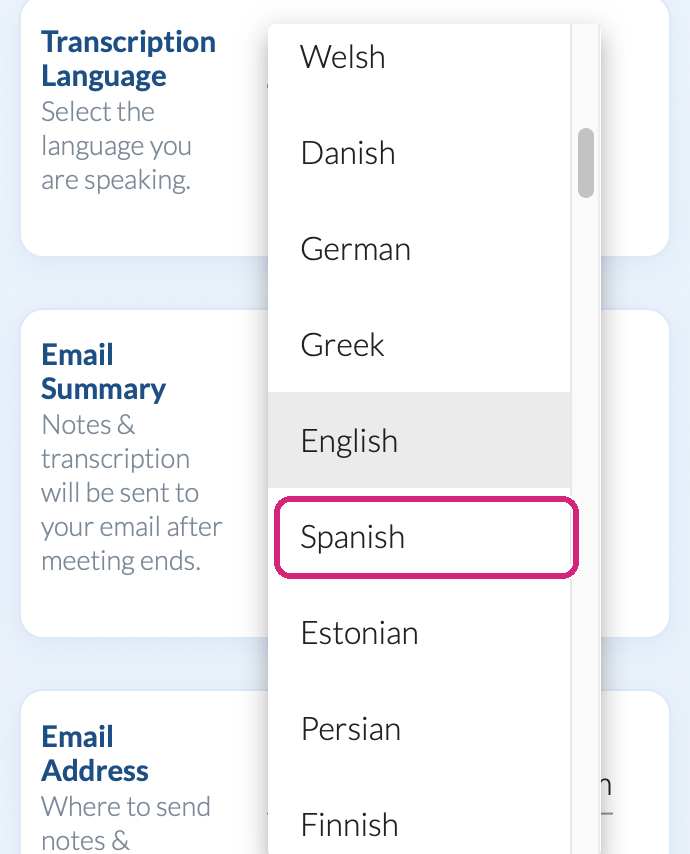 The language menu lists every language Notetaker AI can write in.
 The language menu lists every language Notetaker AI can write in.
Notetaker AI keeps your choice for your next meetings, so change it back before a meeting held in a different language.
During the meeting
Let BlueSky Notetaker AI in from the waiting room if you have one, and approve Zoom's request to let it record. On the Transcription tab, each line then appears in your chosen language under the speaker's name once they finish speaking. The steps are in How to use BlueSky Notetaker AI in a Zoom meeting.
Afterwards
When the meeting ends, the Meeting Summary and Action Items are written in the same language, on your notes page and in the email. The page's and the email's own headings stay in English. Your notes are under AI Notes in the account menu, or at blueskyapps.org/transcriptions: see Where to find your notes, summary and transcript after a Zoom meeting.
For example, a weekly team sync held in German: choose German, and the transcript, the summary and the action items all arrive in German, ready to download as a Word file and edit.
What people in your meeting see
A participant named BlueSky Notetaker AI, from when it joins until it leaves. Nobody else needs to install anything or choose a language.
The languages you can choose
Afrikaans, Albanian, Amharic, Arabic, Armenian, Assamese, Azerbaijani, Belarusian, Bengali, Bosnian, Bulgarian, Catalan, Chinese, Croatian, Czech, Danish, Dutch, English, Estonian, Finnish, French, Galician, Georgian, German, Greek, Gujarati, Haitian Creole, Hausa, Hebrew, Hindi, Hungarian, Icelandic, Indonesian, Irish, Italian, Japanese, Javanese, Kannada, Kazakh, Khmer, Korean, Lao, Latin, Latvian, Lingala, Lithuanian, Luxembourgish, Macedonian, Malagasy, Malay, Malayalam, Maltese, Maori, Marathi, Mongolian, Myanmar, Nepali, Norwegian, Occitan, Odia, Pashto, Persian, Polish, Portuguese, Punjabi, Romanian, Russian, Sanskrit, Serbian, Shona, Sindhi, Sinhala, Slovak, Slovenian, Somali, Spanish, Sundanese, Swahili, Swedish, Tagalog, Tajik, Tamil, Tatar, Telugu, Thai, Turkish, Turkmen, Ukrainian, Urdu, Uyghur, Uzbek, Vietnamese, Welsh, Yiddish and Yoruba.
English is chosen until you change it.
Questions people ask
What if people speak two languages in one meeting?
Notetaker AI writes in one language per meeting, so choose the one most of the meeting will be held in.
Is a language other than English free?
Yes. Every language is on every plan, the Free plan included. See Is BlueSky Notetaker AI for Zoom free? Plans, trial and limits.
Still stuck? Send us a message and our team will help.