
Is 123 Notetaker safe? Recording, consent and where your notes are stored
We want you to know exactly what 123 Notetaker AI does in your meeting before you let it in. In short: it joins as a guest everyone can see, it records video and audio unless you switch that off, it transcribes on our servers, it sends the transcript text to OpenAI to write the summary, and it keeps your notes until you delete them.
What it does, step by step
It joins as a visible guest you have to admit
The notetaker appears in the meeting as 123 Notetaker. It waits in the lobby until someone admits it, and Teams marks it Unverified and asks Admit this unverified bot? first. Everyone in the meeting can see it in the participant list.
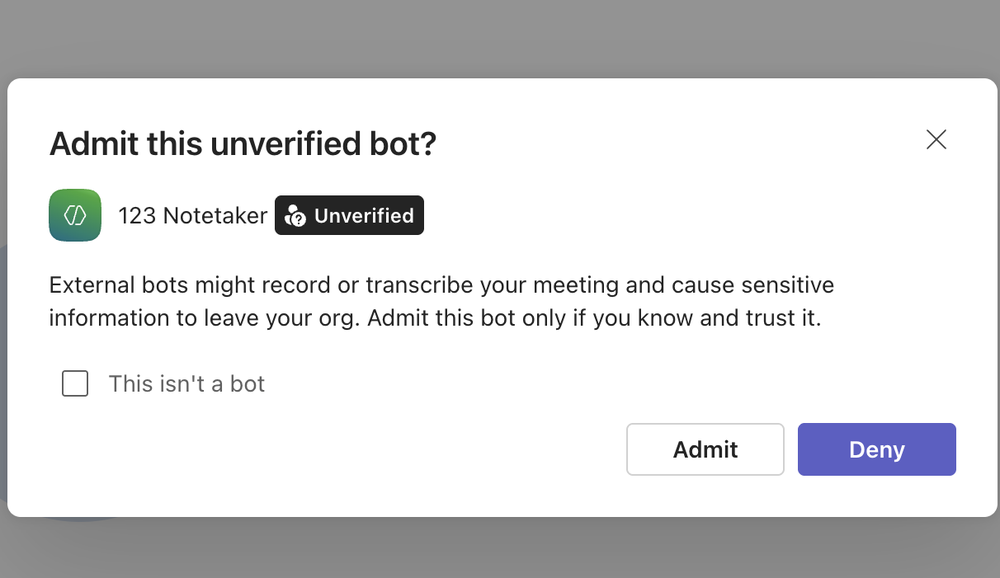 Teams asks before any outside notetaker can join.
It records video and audio, unless you switch that off
Record Video is on unless you turn it off in the Settings tab. When it's on, the notetaker records what it sees of the meeting, with the meeting's audio, and saves it to our storage. Switch it off and no video or audio file is kept. Here's how to transcribe without recording.
It transcribes on our servers
Speech is turned into text on our own servers while the meeting happens, and each line is named after the speaker Teams shows. Anyone who opens the app in the meeting can follow the live transcript.
It sends the transcript text to OpenAI for the summary
When the meeting ends, the transcript text goes to an AI model from OpenAI, which writes the summary and action items. The video and audio aren't sent. If no next steps were said out loud, the AI suggests some, and like any AI it can make mistakes, so check anything important.
It sends the notes where your settings say
The notes email goes to the address in Email Address, and to everyone on the calendar invite if Send Notes to Attendees is on. Check Email Summary and Send Notes to Attendees before a sensitive meeting.
It keeps your notes until you delete them
Your transcript, summary and recording are in your BlueSky account, where only you can open them. Nothing expires on its own, and removing the app from Teams doesn't delete them. You can delete one meeting from AI Meeting Notes or everything with Delete my account on your account page.
Questions people ask
What are the risks of using an AI notetaker?
The main ones are a written record reaching more people than you meant, and an AI summary that gets something wrong. Check who the notes email goes to, switch off Record Video when you don't need a video, and read the action items before you share them.
Can I transcribe a Teams meeting without people knowing?
No. The notetaker is a named participant, someone has to admit it, and Teams warns the person admitting it that it might record or transcribe. We think that's right. Tell people at the start that it's taking notes, and follow your organization's rules on recording.
Who can see my notes?
Only you, in your BlueSky account, plus whoever the notes email goes to. If a colleague opened 123 Notetaker first in a meeting, the notes are theirs.
Can I use AI to take notes in Teams?
Yes. Here's how to use 123 Notetaker AI in a Teams meeting.
Our privacy policy has the full detail. Still stuck? Send us a message and our team will help.