
A sign-in sheet for a Zoom meeting
Attendance Taker writes the sign-in sheet while your Zoom meeting runs, and nobody has to sign anything: each person is listed by name with the time they joined, the time they left and their minutes in the meeting. You download it as a CSV or Excel file to print, file or send on.
Zoom generates its own reports only for meetings hosted by paid accounts (Zoom's reporting page).
Before you start
- Add Attendance Taker to Zoom. You do this once.
- You need to be the host or a co-host of the meeting.
- Attendance Taker records only while it is open on your Zoom, so open it as the meeting starts and leave it open.
Make the sheet
- Before people arrive, ask them to join under their full name. The sheet shows the name each person uses in Zoom, and anyone who joins without signing in to Zoom is listed under the name they typed.
- In the meeting toolbar, click More, then Apps. If your toolbar already shows an Apps button, click that.
- Click Attendance Taker in your list of apps. If it isn't there, add Attendance Taker to Zoom first. If Zoom asks for permission, click Allow. The first time, a welcome message appears: click Let's go.
- Leave Attendance Taker open. People are added to Live Attendance Record as they join.
- Before you end the meeting, click Download XLS or Download CSV under the list. The report page opens in your browser and the file downloads from there.
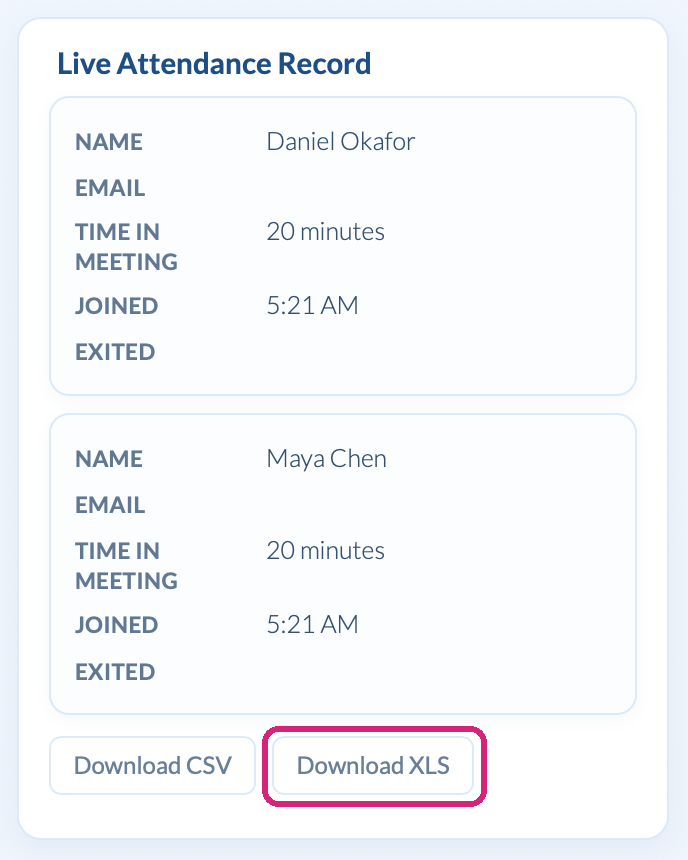 The download buttons sit under the live list.
 The download buttons sit under the live list.
If you forget, the sheet is still there after the meeting: see Where to find your Zoom attendance report after the meeting.
What is on the sheet
| Column | What it shows |
|---|---|
| Name | The person's Zoom display name |
| Total Time in Meeting (Minutes) | Their minutes in the meeting, added up if they left and came back |
| Joined | When they first joined, or when you opened Attendance Taker if they were already there |
| Exited | When they last left |
| Zoom ID | Zoom's ID for them |
| Their email address, only if you requested emails and they agreed to share it |
What it isn't
- It has no signatures. It is a record of who was in the meeting and for how long.
- Someone who never joined isn't on it. Compare it with your invitation list to see who was missing.
An example: a staff training for 25
Twenty-three people join a 50-minute session. Your sheet has 23 rows, and the two who left early show about 30 minutes where the rest show about 50. The two who never joined aren't on it.
Send it to the person who needs it
If the sheet is for a registrar, HR or a training coordinator, Attendance Taker can email it to them after every meeting: see Email the Zoom attendance report to yourself or someone else.
What people in your meeting see
Nothing. If you also want email addresses on the sheet, that takes a request through Zoom: see Zoom attendance without registration, with names and emails.
Questions people ask
Can I get a sign-in list at one moment, such as the start?
Yes. A roll call saves the names of everyone there at the moment you click: see Take a roll call during a Zoom meeting.
Still stuck? Send us a message and our team will help.