
How to remove Polls, Surveys & Forms from Zoom
Removing the app takes a minute, in the Zoom App Marketplace. Two things to know first: your polls and results are kept, and removing the app doesn't cancel a paid BlueSky plan.
Remove the app
-
Sign in to the Zoom App Marketplace.
-
Click Manage, then Added Apps.
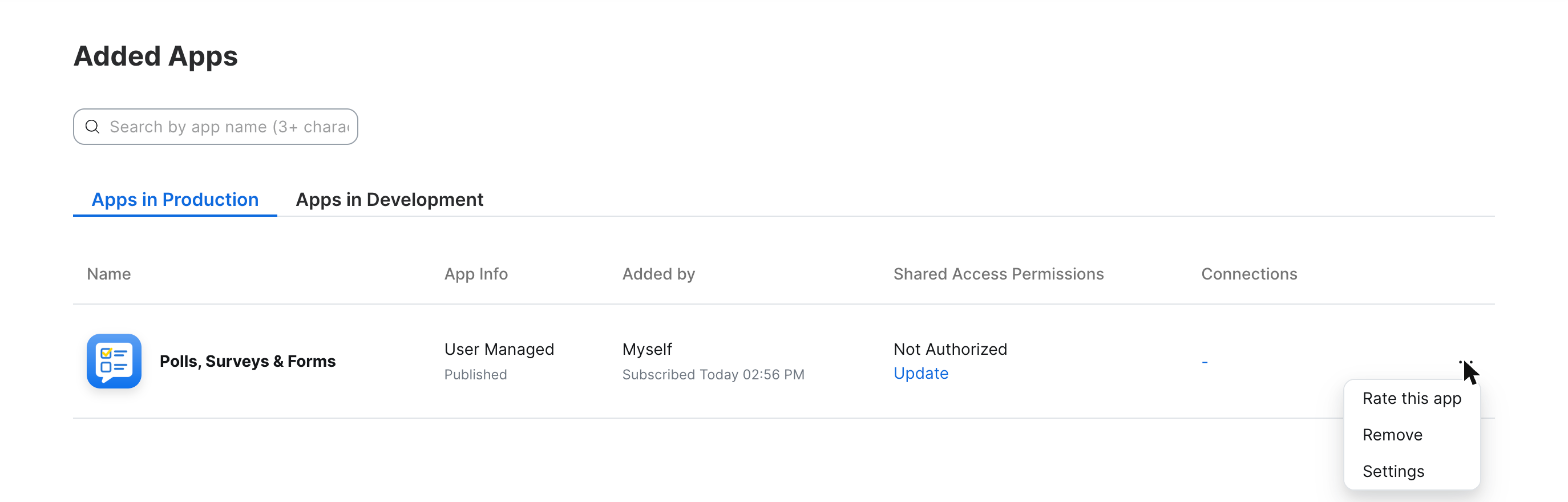 Added Apps in the Zoom App Marketplace, with Remove in the menu beside Polls, Surveys & Forms.
-
Find Polls, Surveys & Forms, click the ••• menu at the end of its row, then Remove.
 Added Apps in the Zoom App Marketplace, with Remove in the menu beside Polls, Surveys & Forms.
What happens to your polls
They stay. Add the app again with the same Zoom account and your saved polls and past results are there. If you'd like them deleted, see what data we keep and how to delete it, or send us a message and we'll delete them for you.
If you have a paid plan
Removing the app doesn't cancel it. Cancel from your subscriptions page, or send us a message and we'll help.
Leaving because something didn't work?
I'd love to hear what happened. Tell us and we'll try to fix it.