
Take attendance automatically in every Zoom meeting
Attendance Taker starts taking attendance the moment it opens in your Zoom meeting, with nothing to switch on, and Zoom can open it for you in your meetings so you don't have to remember. It records everyone there, with when they joined, when they left and their minutes in the meeting.
Zoom generates its own reports only for meetings hosted by paid accounts, after the meeting has ended (Zoom's reporting page).
Before you start
- Add Attendance Taker to Zoom. You do this once.
- You need to be the host or a co-host of the meeting.
- Attendance Taker records only while it is open on your Zoom, so open it as the meeting starts and leave it open.
Open Attendance Taker automatically in your meetings
- In the meeting toolbar, click More, then Apps. If your toolbar already shows an Apps button, click that.
- Click Attendance Taker in your list of apps. If it isn't there, add Attendance Taker to Zoom first. If Zoom asks for permission, click Allow. The first time, a welcome message appears: click Let's go.
- Click ••• at the top of Attendance Taker, then Auto-open in meetings.
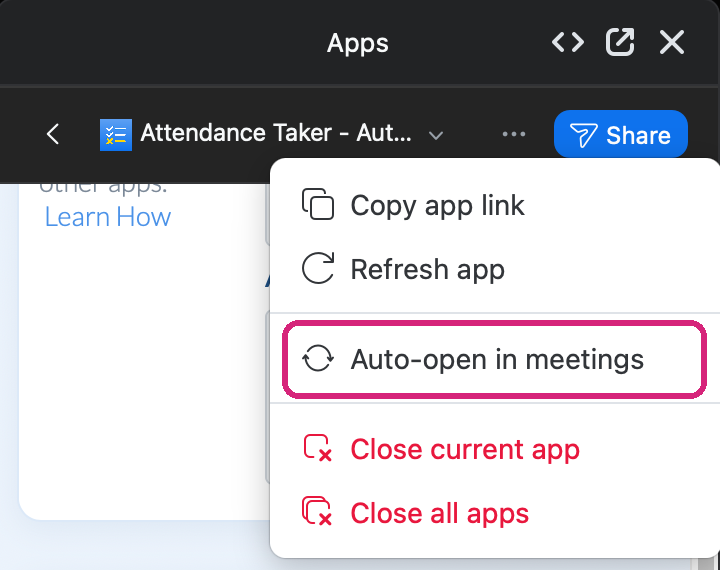 Auto-open in meetings is Zoom's own setting, in the menu at the top of the app.
 Auto-open in meetings is Zoom's own setting, in the menu at the top of the app.
To switch it off, click Auto-open in meetings again. Every meeting Attendance Taker opens in counts as one of your month's meetings, so on the Free plan's 2 meetings a month you may prefer to open it yourself: see Is Attendance Taker for Zoom free? Plans, trial and limits.
Keep it open, but out of your way
Attendance Taker records only while it is open, so don't close it during the meeting. If the panel takes up room you need, click the pop-out icon at the top of Zoom's Apps panel. It moves Attendance Taker into a window of its own.
 The pop-out icon moves Attendance Taker into its own window.
What the automatic record keeps
On the Automatic tab, Live Attendance Record has one entry for each person, and it updates as people join and leave.
- Someone who leaves and comes back keeps one entry. The report shows when they first joined, when they last left and their total minutes in the meeting.
- For anyone already there when you open it, the Joined time is the moment you opened Attendance Taker.
- If someone changes their name in Zoom during the meeting, their entry changes to match.
- Someone who joins without signing in to Zoom is listed under the name they typed.
Get the report after every meeting
Turn on Email Reports once and the report is emailed after each meeting: see Email the Zoom attendance report to yourself or someone else. Every report is also kept on your Attendance Records page: see Where to find your Zoom attendance report after the meeting.
An example: a weekly team meeting
With Auto-open in meetings and Email Reports both on, four weekly meetings in a month give you four reports in your inbox and four rows on Attendance Records, without opening anything yourself. Those four meetings need Hobby or higher, because the Free plan covers 2 a month.
What people in your meeting see
Nothing. Attendance Taker opens in your own Zoom window, and nothing joins the meeting as a participant.
Still stuck? Send us a message and our team will help.