
Repeating timer in Zoom for rounds, stations and focus sessions
For rounds that repeat, such as 25 minutes of focus and a 5-minute break, BlueSky Timer restarts the countdown in Zoom by itself, so nobody has to watch the clock. Set After Timer Count Ends to Repeat Timer, and use Wait time for the gap between rounds.
Zoom's own Timer app is one countdown or stopwatch. Its page names no repeat.
Before you start
- Add BlueSky Timer to your Zoom account. You do this once, and Add BlueSky Timer to Zoom walks through each screen.
- To show the timer on your own video, you need to be the host or a co-host, with your camera on.
- Know your two numbers: how long a round lasts, and how long the gap between rounds is.
Set up the rounds
- In the meeting toolbar, click More, then Apps. If your toolbar already shows an Apps button, click that.
- Click the Timer in your list of apps. Zoom lists it as "Timer - Clock, Agenda, Countdown & Stopwatch". If it isn't there, add BlueSky Timer to Zoom first. If Zoom asks for permission, click Allow. The first time, a short tour appears: step through it and click Let's Go!
- Set Count Time to the length of one round.
- Scroll down to After Timer Count Ends and choose Repeat Timer.
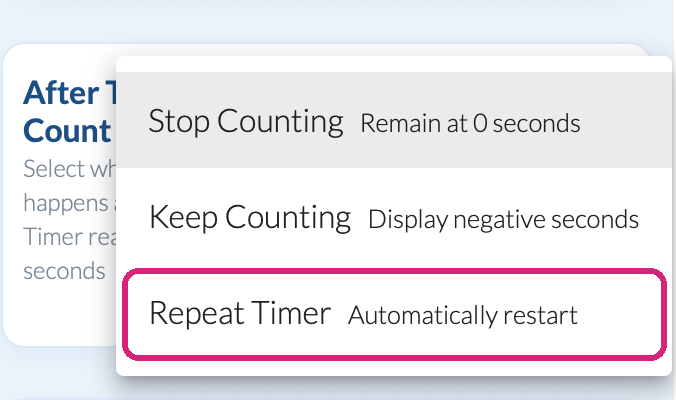 Repeat Timer is the third choice under After Timer Count Ends.
- A new setting, Wait time, appears below it. Set it to the gap between rounds.
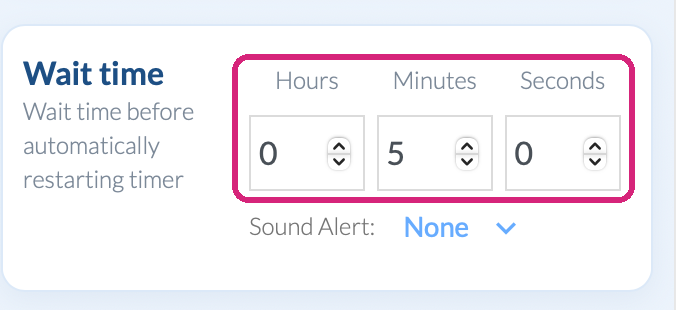 Wait time is the break between one round and the next.
- Scroll back up, click Share Timer Display, then Start Timer.
 Repeat Timer is the third choice under After Timer Count Ends.
 Wait time is the break between one round and the next.
During the meeting
The round counts down to zero. The timer then counts down the wait, in gray so it's clear this isn't a round, and starts the next round by itself. It keeps going until you click Stop Timer. Pause Timer holds it where it is.
Three ways to use it
- For focus sessions, set Count Time to 25 minutes and Wait time to 5 minutes. People work through the round and stretch through the wait.
- For speed networking, set Count Time to 4 minutes and Wait time to 30 seconds, which gives everyone time to change partners.
- For stations in a class or workshop, set Count Time to 10 minutes and Wait time to 1 minute for the changeover.
What people in your meeting see
They see the same countdown you do, wherever they see your video: the round, then the gray wait, then the next round. The timer changes color at your Warning Time and Alert Time in every round.
Questions people ask
Can each round have a different length?
Not with Repeat Timer, which repeats one length. For a sequence of different lengths, use the Agenda Timer: see Run a timed agenda during a Zoom meeting.
Still stuck? Send us a message and our team will help.