
What question types can I use in a Zoom poll? Quiz, word cloud, rating and more
Don't have the app yet? Add Polls, Surveys & Forms to Zoom. It's free to start. Already have it? Open it in Zoom.
There are eleven, and you pick one per question from the Answer type menu. A survey can mix them, so one question can be a rating and the next a word cloud.
 The Answer type menu open, showing every question type you can choose.
| Answer type | What people do | Good for |
|---|---|---|
| Emoji feedback | Tap a quick yes, no or emoji reaction (up to 6 options) | A fast read of the room |
| Single choice | Choose one answer | Decisions and votes |
| Multiple choice | Choose several answers, up to the number you set | "Which of these apply?" |
| Quiz | Choose from answers where you've marked the correct ones | Knowledge checks and training |
| Written answer | Type a short response | Open questions |
| Idea board | Type an idea in a bigger box, for longer answers | Brainstorms |
| Word cloud | Enter one word or a short phrase | Themes, at a glance |
| Rating | Rate from 1 up to 2, 3, 4 or 5 | Session and speaker feedback |
| Agreement scale | Say how strongly they agree or disagree | Statements and proposals |
| Recommendation score | Choose a score from 0 to 10 | "How likely are you to recommend us?" |
| Ranking | Put two to ten items in order | Priorities |
Choice questions take up to 20 options.
Written answer and Idea board both collect typed answers and list them in results. Idea board just gives people more room. In Zoom, people can't vote on each other's ideas.
Run a quiz
-
Set Answer type to Quiz and type the answers.
-
Tick the correct answer beside each option that's right. You can mark more than one.
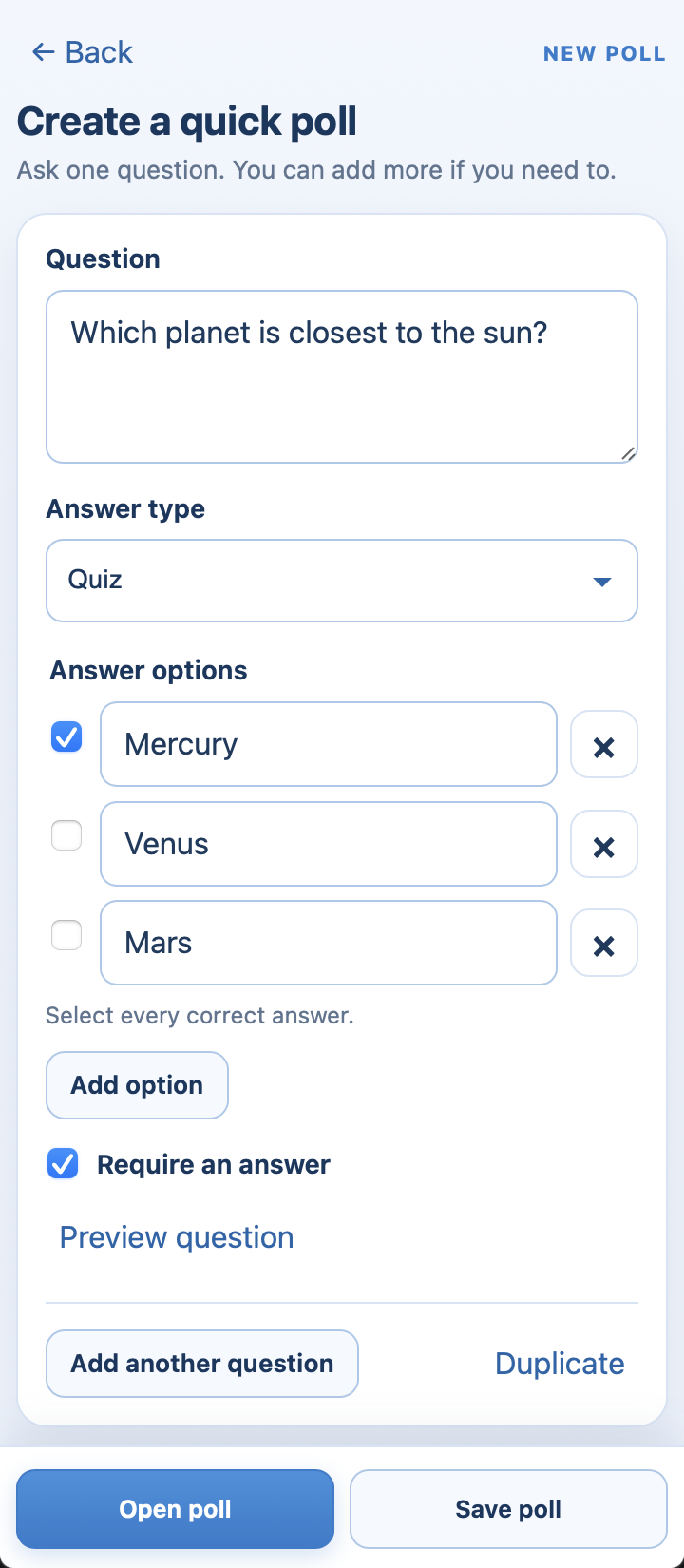 A quiz question with the correct answer ticked.
-
Open the poll.
 A quiz question with the correct answer ticked.
People see the correct answers only once no more answers can count: after you close responses, or after you click Show results to participants if you chose to show results yourself.
Make a word cloud
Set Answer type to Word cloud and ask something that has a one-word answer ("One word for how this quarter felt?"). Each person enters a word or short phrase, and repeated words grow.
 Word cloud results, where the words people gave most often appear largest.
Good to know
-
Tick Require an answer on any question people shouldn't skip.
-
Click Preview question to see it the way participants will.
-
Pictures on questions aren't available in the Zoom app yet.
Still stuck? Send us a message and our team will help.