
Emoji reactions not showing on your Zoom video
Start with your camera. Epic Reactions plays on your camera video, so nothing shows while the camera is off, and it connects by itself as soon as your video starts.
If your camera is on, the line at the top of Epic Reactions says what's happening. Find yours below.
You see "Please turn on your camera to display Epic Reactions."
Turn your camera on in Zoom. Epic Reactions connects to your video by itself and the line changes to say it's connected. Then click an emoji.
 This line stays until your camera is on.
It stays on "Connecting to Zoom video."
While it connects, Epic Reactions also shows "Please allow a minute to connect Epic Reactions with Zoom video." If it hasn't connected after about a minute, a new line appears: "It's taking a while to connect video."
- Click Try again in that line.
- If it still doesn't connect, refresh Epic Reactions and update Zoom. Both are below.
Refresh Epic Reactions
A refresh reloads the app and connects it to your video again. It's worth doing whenever Epic Reactions is connected but nothing plays.
- Click ••• at the top of the Epic Reactions panel.
- Click Refresh app.
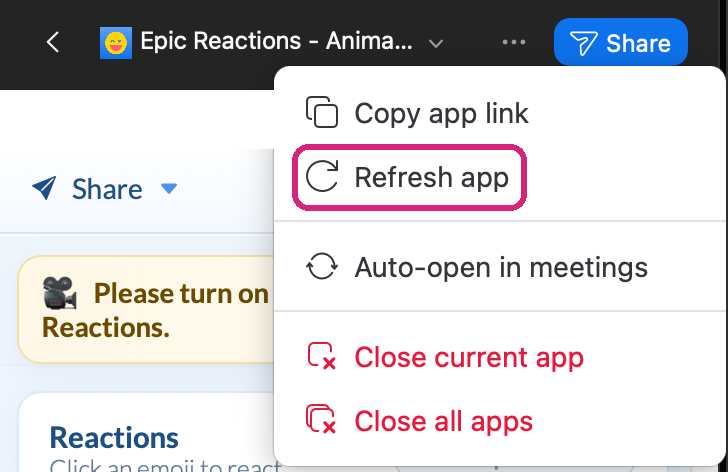 Refresh app is in the menu at the top of the panel.
 Refresh app is in the menu at the top of the panel.
You see "Please upgrade to the latest Zoom version to properly display video."
- In the Zoom desktop app, click your profile picture, then Check for updates.
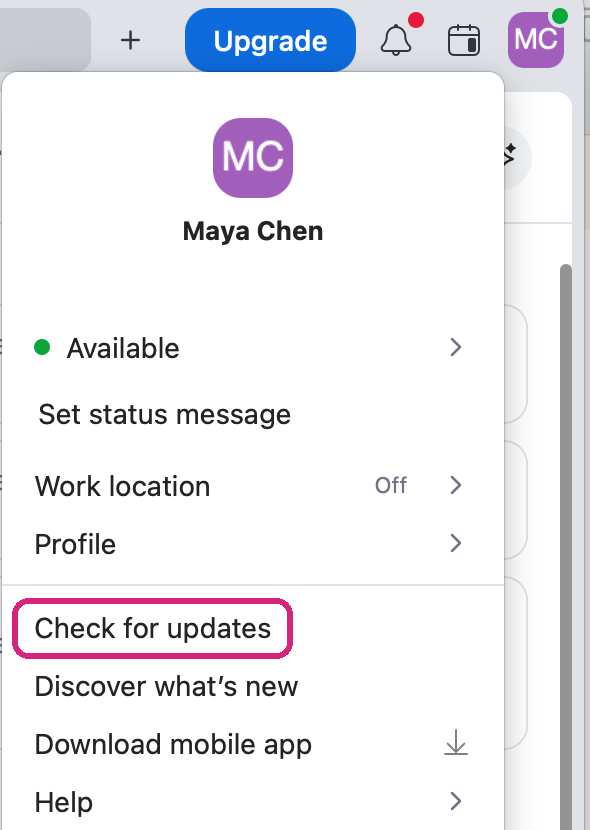 Check for updates is in the menu under your profile picture.
- Install the update, join your meeting again and open Epic Reactions.
 Check for updates is in the menu under your profile picture.
A message covers the app
You've reached this month's meetings on your plan, or the Free plan's time limit for one meeting. Is Epic Reactions for Zoom free? Plans, trial and limits explains both and when the app comes back.
Zoom's own reaction button doesn't play the big animation
Reactions you send with Zoom's own reaction button are animated only while Epic Reactions is open. Open it from Apps first, then react.
The emoji move too slowly
Animation speed, under Advanced, sets how fast the emoji move, from 0.75× to 2.5×. A new account starts at 1×. It needs a paid plan or the free trial: see Change the size, speed and style of emoji reactions in Zoom.
Still stuck? Send us a message with your Zoom version, whether you're on Windows or Mac, and what the line at the top of Epic Reactions says, and our team will help.